Skeleton X-Ray
See the Bones
Transform any photo into a realistic medical-style X-ray render. Skull, ribs, and bones glow against a dark background — AI-generated in seconds.


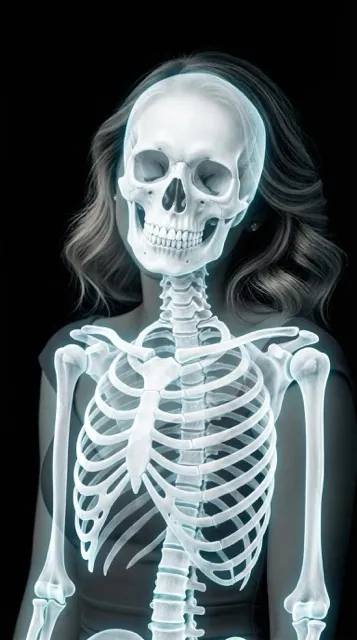
What Is the Skeleton X-Ray Filter?
Real X-rays use ionizing radiation to pass through soft tissue and reveal dense structures like bones. The skeleton X-ray filter recreates that look — bright white bones against dark surroundings — without any radiation or hospital equipment.
The AI model preserves your subject's pose and framing, then renders anatomically suggestive bones beneath a semi-transparent outer layer. A subtle cyan glow on the bone edges gives it that signature scientific look.
How the Skeleton Filter Works
1. Pick a Photo
Full-body portraits and clear poses produce the most dramatic results — but any photo works.
2. Select Skeleton
Tap the skeleton style — the AI generates the X-ray render in about 10 seconds.
3. Save & Share
Save to your camera roll or share instantly. Perfect for Halloween, memes, or creative projects.
Other X-Ray Styles
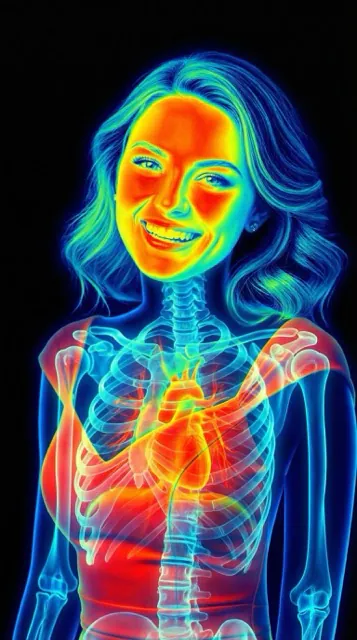
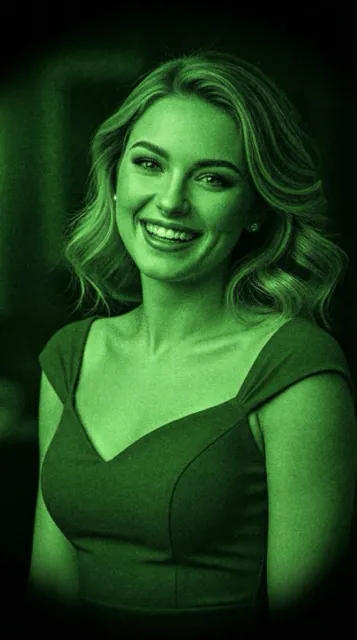
Combine skeleton with thermal or night vision for a full X-Ray toolkit.
Frequently Asked
What does the skeleton X-ray filter do?
It transforms your photo into a medical-style X-ray render, revealing a bright white skeleton against a dark background while keeping the subject's original pose and framing.
Is this a real X-ray?
No. This is an AI-generated artistic render that mimics the look of a real X-ray — it's not a diagnostic medical image and shouldn't be used for any clinical purpose.
Can I use it on pets or objects?
Yes — the AI adapts to portraits, pets, and even everyday objects. Results are most dramatic on full-body portraits where the skeletal structure is clearly suggested.
Is the app free?
Yes, X-Ray Camera is free to download on iOS and Android with skeleton, thermal, and night vision styles included.
Try Skeleton X-Ray Free
Download X-Ray Camera and turn your first photo into a skeleton render — free, no account needed.